Standardized Reseller ID capture for distributor connectors
Minor Upgrade
❗ Important: This feature is currently in the Preview status.
Distributor connectors now use a consistent approach for capturing vendor-specific reseller IDs when Marketplace Managers connect a distributor account and complete connector registration.
Previously, reseller ID capture varied by connector. For example, some distributors required a reseller ID during account registration while others used different field names or flows. With this release, each distributor connector surfaces vendor-specific reseller ID fields through the same registration experience, using a standardized field model (can be required or optional with validation rules as defined for that vendor).
This makes it easier to configure connectors such as TD Synnex and Ingram Micro from one predictable workflow and reduces setup errors when a vendor requires a reseller identifier for purchases.
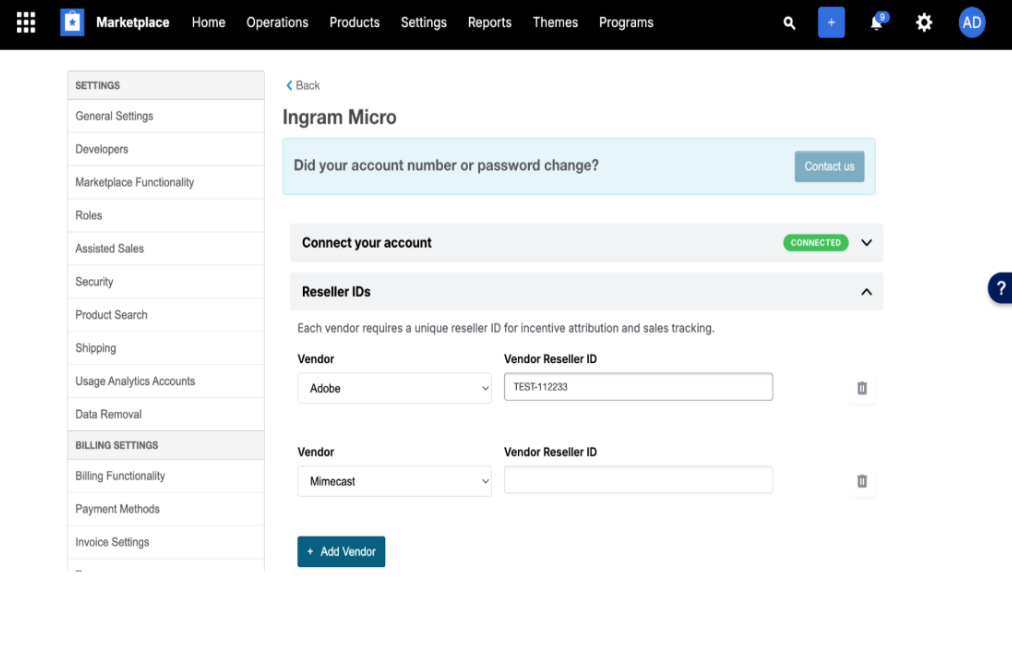
To configure a reseller ID,
- Go to Settings > Vendor Integrations > Distributor Integrations.
- Select a vendor or click +Add Vendor to add a new vendor.
- Enter the vendor's reseller ID.
Feature enablement
This feature is not enabled by default. Contact your AppDirect technical representative to request it.
Setting enablement
No setting enablement is required.
Documentation
Documentation will be updated when the feature moves to Early Availability (EA) or General Availability (GA). For documentation on current distributor connector setup, see:
Was this page helpful?
Tell us more…
Help us improve our content. Responses are anonymous.
Thanks
We appreciate your feedback!